반응형

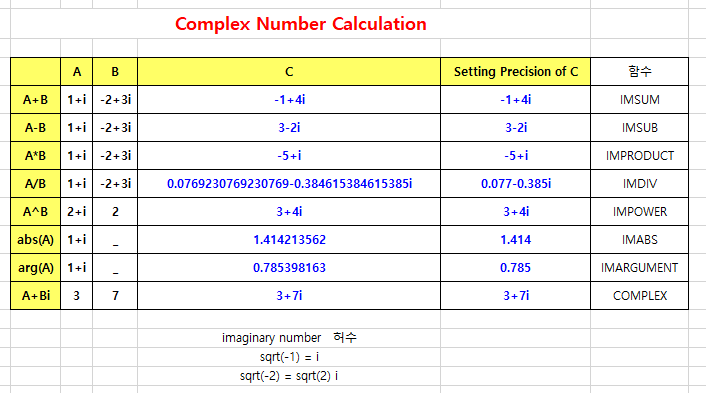
복소수의 계산


imaginary number   허수

sqrt(-1) = i

sqrt(-2) = sqrt(2) i


복소수 관련 함수

IMSUM

IMSUB

IMPRODUCT

IMDIV

IMPOWER

IMABS

IMARGUMENT

COMPLEX


Complex Calculation.xlsx
0.01MB


반응형

'엑셀' 카테고리의 다른 글

DoE in Excel  (0) 2023.05.19
엑셀 백업 파일 항상 만들기  (0) 2023.05.18
SIGN function  (0) 2023.05.17
3번째 y축 추가하기  (0) 2023.05.09
축제목 연동하기  (0) 2023.05.03
반응형

SIGN function


This article describes the formula syntax and usage of the SIGN function in Microsoft Excel.

Description
Determines the sign of a number. Returns 1 if the number is positive, zero (0) if the number is 0, and -1 if the number is negative.

Syntax
SIGN(number)

The SIGN function syntax has the following arguments:

Number    Required. Any real number.

Example
Copy the example data in the following table, and paste it in cell A1 of a new Excel worksheet. For formulas to show results, select them, press F2, and then press Enter. If you need to, you can adjust the column widths to see all the data.


FormulaDescriptionResult

=SIGN(10) Sign of a positive number. 1
=SIGN(4-4) Sign of the result of 4 minus 4 (zero). 0
=SIGN(-0.00001) Sign of a negative number. -1
반응형

'엑셀' 카테고리의 다른 글

엑셀 백업 파일 항상 만들기  (0) 2023.05.18
복소수의 계산  (0) 2023.05.18
3번째 y축 추가하기  (0) 2023.05.09
축제목 연동하기  (0) 2023.05.03
q.xlsx파일을 열었는데 표시는 q.xlsx:2로 표시됨  (0) 2023.04.27
반응형

3번째 y축 추가하기
 
1. 배열 3개를 선택하여 분산형 그래프를 그린다.
2. 첫번째 배열을 주축, 두번째와 세번째 배열을 보조축으로 선택하였다.
3. 3번째 y축을 만든다.
    배열을 만들어 넣는다.
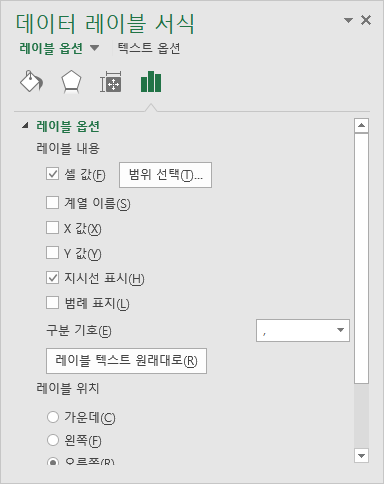
4. 3번째 축의 데이터계열서식, 데이터 레이블 추가를 한다.


데이터계열서식
데이터 레이블 서식
레이블 내용
셀 값

3-axis-graph-excel.xlsx
0.04MB


이 자료는 https://engineerexcel.com/에서 제공한 것을 따라 해본 것입니다.
 
https://www.youtube.com/watch?v=CpR8QvC6pAA 
 
https://engineerexcel.com/3-axis-graph-excel/
 

반응형

'엑셀' 카테고리의 다른 글

복소수의 계산  (0) 2023.05.18
SIGN function  (0) 2023.05.17
축제목 연동하기  (0) 2023.05.03
q.xlsx파일을 열었는데 표시는 q.xlsx:2로 표시됨  (0) 2023.04.27
기본 프로그램으로 설정되어 있지 않음  (0) 2023.04.27

+ Recent posts